
-0.6.0.dev1062-gold?style=flat)
注釈
Go to the end to download the full example code.
Reykjanes Isosurface#
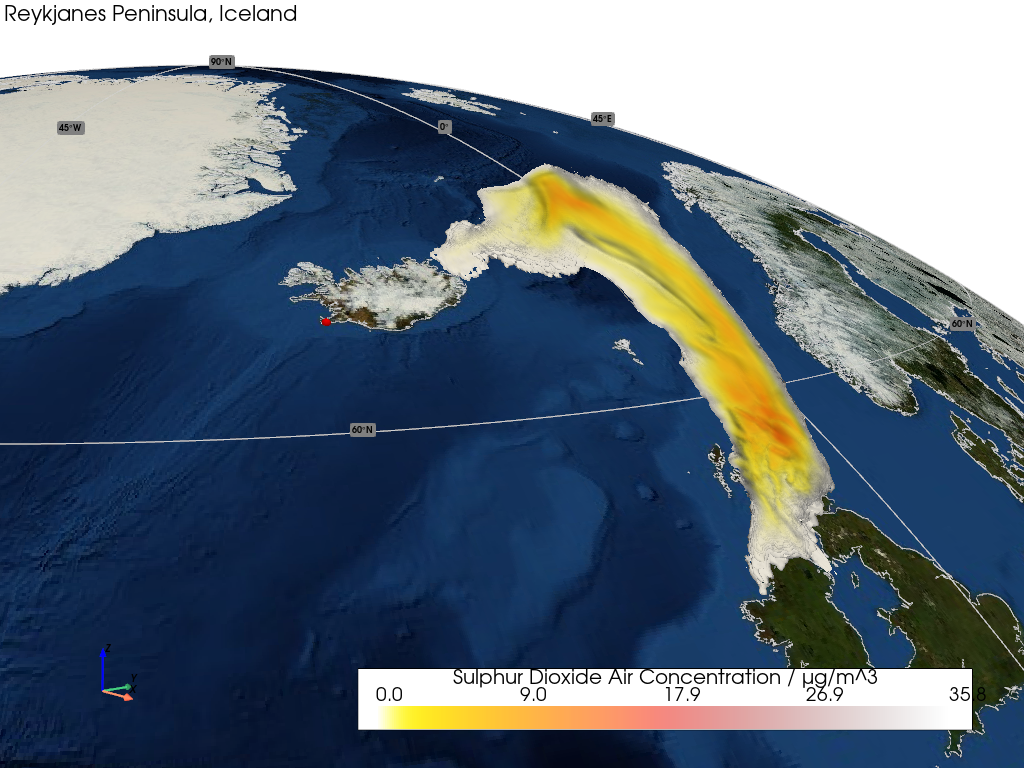
This example demonstrates how to render the isosurfaces of a 3D structured grid.
📋 まとめ#
The sample data is taken from a Met Office NAME Model time-series simulation of the Icelandic Reykjanes Peninsula eruption on 29 May 2024.
A structured grid of cubic voxels is constructed for the 1D spatial coordinates and then thresholded to reveal the underlying volcanic plume of Sulphur Dioxide Air Concentration.
The visualization is enhanced by rendering isosufaces of the plume using a mixture of opacity and smooth shading to yield a semi-transparent cloud-like effect.
The cited release location of the eruption on the peninsula is marked, highlighting the volcanic plume's eastward transport and southerly dispersion.
警告
Structured grid projection transformation support is pending.
from __future__ import annotations

import pyvista as pv

import geovista as gv
from geovista.pantry.data import name_reykjanes


def main() -> None:
    """Plot the volcanic plume structured grid isosurfaces.

    Notes
    -----
    .. versionadded:: 0.6.0

    """
    # Load the sample data.
    sample = name_reykjanes()

    # Create the structured grid.
    grid = gv.Transform.to_structured_grid(
        sample.xs,
        sample.ys,
        sample.zs,
        data=sample.data,
    )

    # Remove cells from the grid with NaN values then calculate the data range.
    grid = grid.threshold()
    clim = grid.get_data_range()

    # Generate the plume isosurface.
    isosurfaces = grid.cell_data_to_point_data().contour(isosurfaces=500)

    # Now render the plotter scene.
    p = gv.GeoPlotter()
    p.add_base_layer(texture=gv.blue_marble(), zlevel=0)
    p.add_coastlines()
    p.add_graticule()
    sargs = {"title": f"{sample.name} / {sample.units}", "fmt": "%.1f"}
    p.add_mesh(
        isosurfaces,
        clim=clim,
        cmap="fire_r",
        opacity="linear_r",
        smooth_shading=True,
        scalar_bar_args=sargs,
    )
    p.add_text(
        "Reykjanes Peninsula, Iceland",
        position="upper_left",
        font_size=10,
    )

    # Mark the event release location.
    p.add_points(
        xs=sample.poi.longitude,
        ys=sample.poi.latitude,
        render_points_as_spheres=True,
        color="red",
        point_size=10,
    )

    # Define a specific camera position and orientation.
    cpos = pv.CameraPosition(
        position=(0.8957959335673299, -0.47394138433018956, 0.9968046553672109),
        focal_point=(-0.10638261870474444, 0.3538637910944052, 0.715402511958916),
        viewup=(-0.17014498616109472, 0.12623579798398435, 0.977299957531764),
    )

    p.add_axes()
    p.show(cpos=cpos)


if __name__ == "__main__":
    main()