
-0.6.0.dev1062-gold?style=flat)
geovista.bridge#
Transform structured grids and unstructured meshes to PyVista format.
This module provides the Transform factory class for
transforming rectilinear, curvilinear, and unstructured geospatial data
into geolocated PyVista mesh instances.
ノート#
Added in version 0.1.0.
属性#
Whether mesh cleaning performed by the bridge. |
|
Default array name for data on the mesh cells. |
|
Default array name for data on the mesh points. |
|
Default array name for mesh vectors. |
|
Type alias for an asset file path. |
|
The default size of the |
|
Type alias for a tuple of integers. |
Classes#
Build a mesh from spatial points, connectivity, data and CRS metadata. |
モジュール内容#
- class geovista.bridge.Transform(xs, ys, /, *, connectivity=None, start_index=None, crs=None, radius=None, zlevel=None, zscale=None, clean=None)[ソース]#
Build a mesh from spatial points, connectivity, data and CRS metadata.
ノート#
Added in version 0.1.0.
Build a mesh from spatial points, connectivity, data and CRS metadata.
Convenience factory to build multiple identical meshes but with different face or node data.
- Parameters:
- xs
ArrayLike A 1D array of x-values, in canonical crs units, defining the vertices of each face in the mesh.
- ys
ArrayLike A 1D array of y-values, in canonical crs units, defining the vertices of each face in the mesh.
- connectivity
ArrayLikeorShape, optional Defines the topology of each face in the unstructured mesh in terms of indices into the provided xs and ys mesh geometry arrays. The connectivity is a 2D
(M, N)array, whereMis the number of mesh faces, andNis the number of nodes per face. Alternatively, an(M, N)tuple defining the connectivity shape may be provided instead, given that the xs and ys defineM*Npoints (at most) in the mesh geometry. If no connectivity is provided, and the xs and ys are 2D, then their shape is used to determine the connectivity. Also, note that masked connectivity may be used to define a mesh consisting of different shaped faces.- start_index
int, default=0 Specify the base index of the provided connectivity in the closed interval [0, 1]. For example, if start_index=1, then the start_index will be subtracted from the connectivity to result in 0-based indices into the provided mesh geometry. If no start_index is provided, then it will be determined from the connectivity.
- crs
CRSLike, optional The Coordinate Reference System of the provided xs and ys. May be anything accepted by
pyproj.crs.CRS.from_user_input(). Defaults toEPSG:4326i.e.,WGS 84.- radius
float, optional The radius of the mesh sphere. Defaults to
RADIUS.- zlevel
int, default=0 The z-axis level. Used in combination with the zscale to offset the radius by a proportional amount i.e.,
radius * zlevel * zscale.- zscale
float, optional The proportional multiplier for z-axis zlevel. Defaults to
ZLEVEL_SCALE.- clean
bool, optional Specify whether to merge duplicate points, remove unused points, and/or remove degenerate cells in the resultant mesh. See
pyvista.PolyDataFilters.clean(). Defaults toBRIDGE_CLEAN.
- xs
ノート
Added in version 0.1.0.
- __call__(*, data=None, name=None)[ソース]#
Build the mesh and attach the provided data to faces or nodes.
- Parameters:
- data
ArrayLike, optional Data to be optionally attached to the mesh face or nodes.
- name
str, optional The name of the optional data array to be attached to the mesh. If data is provided but with no name, defaults to either
NAME_POINTSorNAME_CELLS.
- data
- Returns:
PolyDataThe spherical mesh.
ノート
..versionadded:: 0.1.0
- classmethod from_1d(xs, ys, /, *, data=None, name=None, crs=None, rgb=False, radius=None, zlevel=None, zscale=None, clean=None)[ソース]#
Build a quad-faced mesh from contiguous 1D x-values and y-values.
This allows the construction of a uniform or rectilinear quad-faced
(M, N)mesh grid, where the mesh hasM-faces in the y-axis, andN-faces in the x-axis, resulting in a mesh consisting ofM*Nfaces.The provided xs and ys will be projected from their crs to geographic longitude and latitude values.
- Parameters:
- xs
ArrayLike A 1D array of x-values, in canonical crs units, defining the contiguous face x-value boundaries of the mesh. Creating a mesh with
N-faces in the crs x-axis requires a(N+1,)array. Alternatively, a(N, 2)contiguous bounds array may be provided.- ys
ArrayLike A 1D array of y-values, in canonical crs units, defining the contiguous face y-value boundaries of the mesh. Creating a mesh with
M-faces in the crs y-axis requires a(M+1,)array. Alternatively, a(M, 2)contiguous bounds array may be provided.- data
ArrayLike, optional Data to be optionally attached to the mesh. The size of the data must match either the shape of the fully formed mesh points
(M+1)*(N+1), or the number of mesh faces,M*N(but see the rgb parameter).- name
str, optional The name of the optional data array to be attached to the mesh. If data is provided but with no name, defaults to either
NAME_POINTSorNAME_CELLS.- crs
CRSLike, optional The Coordinate Reference System of the provided xs and ys. May be anything accepted by
pyproj.crs.CRS.from_user_input(). Defaults toEPSG:4326i.e.,WGS 84.- rgb
bool, default=False Whether data is an
RGBorRGBAimage. Whenrgb=True, data is expected to have an extra dimension for the colour channels (length3or4).- radius
float, optional The radius of the sphere. Defaults to
RADIUS.- zlevel
int, default=0 The z-axis level. Used in combination with the zscale to offset the radius by a proportional amount i.e.,
radius * zlevel * zscale.- zscale
float, optional The proportional multiplier for z-axis zlevel. Defaults to
ZLEVEL_SCALE.- clean
bool, optional Specify whether to merge duplicate points, remove unused points, and/or remove degenerate cells in the resultant mesh. See
pyvista.PolyDataFilters.clean(). Defaults toBRIDGE_CLEAN.
- xs
- Returns:
PolyDataThe quad-faced spherical mesh.
ノート
Added in version 0.1.0.
- classmethod from_2d(xs, ys, /, *, data=None, name=None, crs=None, rgb=False, radius=None, zlevel=None, zscale=None, clean=None)[ソース]#
Build a quad-faced mesh from 2D x-values and y-values.
This allows the construction of a uniform, rectilinear or curvilinear quad-faced
(M, N)mesh grid, where the mesh hasM-faces in the y-axis, andN-faces in the x-axis, resulting in a mesh consisting ofM*Nfaces.The provided xs and ys define the four vertices of each quad-face in the mesh for the native crs, which will then be projected to geographic longitude and latitude values.
- Parameters:
- xs
ArrayLike A 2D array of x-values, in canonical crs units, defining the face x-value boundaries of the mesh. Creating a
(M, N)mesh requires a(M+1, N+1)x-axis array. Alternatively, a(M, N, 4)array may be provided.- ys
ArrayLike A 2D array of y-values, in canonical crs units, defining the face y-value boundaries of the mesh. Creating a
(M, N)mesh requires a(M+1, N+1)y-axis array. Alternatively, a(M, N, 4)array may be provided.- data
ArrayLike, optional Data to be optionally attached to the mesh. The size of the data must match either the shape of the fully formed mesh points
(M+1)*(N+1), or the number of mesh faces,M*N(but see the rgb parameter).- name
str, optional The name of the optional data array to be attached to the mesh. If data is provided but with no name, defaults to either
NAME_POINTSorNAME_CELLS.- crs
CRSLike, optional The Coordinate Reference System of the provided xs and ys. May be anything accepted by
pyproj.crs.CRS.from_user_input(). Defaults toEPSG:4326i.e.,WGS 84.- rgb
bool, default=False Whether data is an
RGBorRGBAimage. Whenrgb=True, data is expected to have an extra dimension for the colour channels (length3or4).- radius
float, optional The radius of the sphere. Defaults to
RADIUS.- zlevel
int, default=0 The z-axis level. Used in combination with the zscale to offset the radius by a proportional amount i.e.,
radius * zlevel * zscale.- zscale
float, optional The proportional multiplier for z-axis zlevel. Defaults to
ZLEVEL_SCALE.- clean
bool, optional Specify whether to merge duplicate points, remove unused points, and/or remove degenerate cells in the resultant mesh. See
pyvista.PolyDataFilters.clean(). Defaults toBRIDGE_CLEAN.
- xs
- Returns:
PolyDataThe quad-faced spherical mesh.
ノート
Added in version 0.1.0.
- classmethod from_points(xs, ys, /, *, data=None, name=None, crs=None, radius=None, zlevel=None, zscale=None, clean=None, vectors=None, vectors_crs=None, vectors_name=None)[ソース]#
Build a point-cloud mesh from x-values, y-values and z-levels.
Note that optional mesh data or vectors must be in the same order as the spatial points.
- Parameters:
- xs
ArrayLike A 1D, 2D or 3D array of point-cloud x-values, in canonical crs units. Must have the same shape as the ys.
- ys
ArrayLike A 1D, 2D or 3D array of point-cloud y-values, in canonical crs units. Must have the same shape as the xs.
- data
ArrayLike, optional Data to be optionally attached to the mesh points defined by xs and ys.
- name
str, optional The name of the optional data array to be attached to the mesh. If data is provided but with no name, defaults to
NAME_POINTS.- crs
CRSLike, optional The Coordinate Reference System of the provided xs and ys. May be anything accepted by
pyproj.crs.CRS.from_user_input(). Defaults toEPSG:4326i.e.,WGS 84.- radius
float, optional The radius of the mesh point-cloud. Defaults to
RADIUS.- zlevel
intorArrayLike, default=0 The z-axis level. Used in combination with the zscale to offset the radius by a proportional amount i.e.,
radius * zlevel * zscale. If zlevel is not a scalar, then its shape must match or broadcast with the shape of the xs and ys.- zscale
float, optional The proportional multiplier for z-axis zlevel. Defaults to
ZLEVEL_SCALE.- clean
bool, optional Specify whether to merge duplicate points. See
pyvista.PolyDataFilters.clean(). Defaults toBRIDGE_CLEAN.- vectors
VectorLike, optional A tuple of 2 or 3 arrays of the same shape as xs and ys. These give eastward (
U), northward (V) and optionally upward (W) vector components, which are converted to an[N, 3]array of 3D vectors and attached to the resultant mesh, see vectors_name. This can be used to generate glyphs (such as arrows) and streamlines.- vectors_crs
CRSLike, optional The Coordinate Reference System of the provided vectors. May be anything accepted by
pyproj.crs.CRS.from_user_input(). Defaults to the same as crs. Note that vectors_crs only specifies horizontal orientation of the vectors. Their magnitudes are always spatial distance, and the vertical component is always radial (i.e., "upwards").- vectors_name
str, optional The name of the vectors array to be attached to the mesh. If vectors is provided but with no vectors_name, defaults to
NAME_VECTORS.
- xs
- Returns:
PolyDataThe point-cloud mesh with optional vectors attached.
ノート
Added in version 0.2.0.
- classmethod from_tiff(fname, /, *, name=None, band=1, rgb=False, sieve=False, size=None, extract=False, radius=None, zlevel=None, zscale=None, clean=None)[ソース]#
Build a quad-faced mesh from the GeoTIFF.
Note that the GeoTIFF data will be located on the
pointsof the resultant mesh.- Parameters:
- fname
PathLike The file path to the GeoTIFF.
- name
str, optional The name of the GeoTIFF data array to be attached to the mesh. Defaults to
NAME_POINTS. Note that{units}may be used as a placeholder for the units of the data array e.g.,"Elevation / {units}".- band
int, default=1 The band index to read from the GeoTIFF. Note that the band index is one-based.
- rgb
bool, default=False Specify whether to read the GeoTIFF as an
RGBorRGBAimage. Whenrgb=True, the band index is ignored.- sieve
bool, default=False Specify whether to sieve the GeoTIFF mask to remove small connected regions. See
rasterio.features.sieve()for more information.- size
int, optional The size of the sieve filter. Defaults to
RIO_SIEVE_SIZE.- extract
bool, default=False Specify whether to extract cells from the mesh with no masked points.
- radius
float, optional The radius of the mesh sphere. Defaults to
RADIUS.- zlevel
int, default=0 The z-axis level. Used in combination with the zscale to offset the radius by a proportional amount i.e.,
radius * zlevel * zscale.- zscale
float, optional The proportional multiplier for z-axis zlevel. Defaults to
ZLEVEL_SCALE.- clean
bool, optional Specify whether to merge duplicate points, remove unused points, and/or remove degenerate cells in the resultant mesh. See
pyvista.PolyDataFilters.clean(). Defaults toBRIDGE_CLEAN.
- fname
- Returns:
PolyDataThe GeoTIFF spherical mesh.
ノート
Added in version 0.5.0.
注意
Optional package dependency
rasteriois required.Examples
>>> from geovista import GeoPlotter, Transform
>>> from geovista.pantry import fetch_raster
>>> from geovista.pantry.textures import natural_earth_1
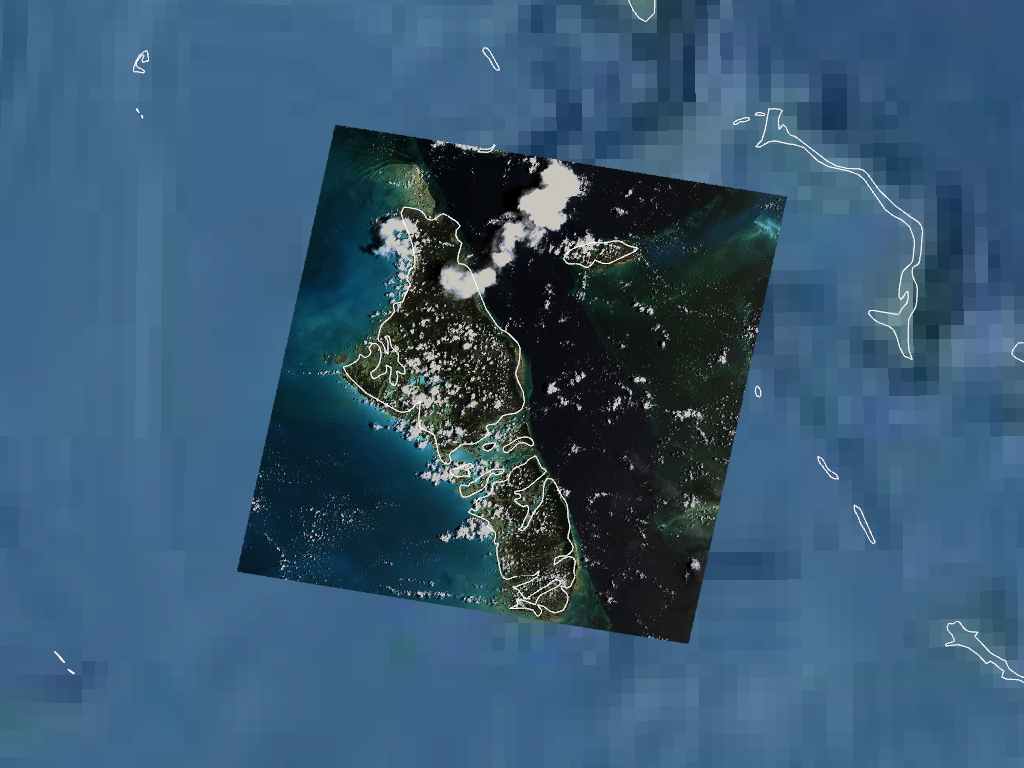
Render the GeoTIFF
RGBimage as a geolocated mesh.First,
rasterio.features.sieve()the GeoTIFF image to remove several unwanted masked regions within the interior of the image, due to a lack of dynamic range in theuint8image data. Then, extract the mesh to remove cells with no masked points.>>> fname = fetch_raster("bahamas_rgb.tif") >>> mesh = Transform.from_tiff(fname, rgb=True, sieve=True, extract=True)
Now render the result:
>>> p = GeoPlotter()
>>> _ = p.add_mesh(mesh, rgb=True)
>>> p.view_poi()
>>> _ = p.add_base_layer(texture=natural_earth_1(), zlevel=0)
>>> _ = p.add_coastlines(color="white")
>>> p.show()
- classmethod from_unstructured(xs, ys, /, *, connectivity=None, data=None, start_index=None, name=None, crs=None, rgb=False, radius=None, zlevel=None, zscale=None, clean=None)[ソース]#
Build a mesh from unstructured 1D x-values and y-values.
The connectivity defines the topology of faces within the unstructured mesh. This is represented in terms of indices into the provided xs and ys mesh geometry.
Note that any optional mesh data provided must be in the same order as the mesh face connectivity, or in the same order as the points described by xs and ys (data can only be attached to points or cells).
- Parameters:
- xs
ArrayLike A 1D array of x-values, in canonical crs units, defining the vertices of each face in the mesh.
- ys
ArrayLike A 1D array of y-values, in canonical crs units, defining the vertices of each face in the mesh.
- connectivity
ArrayLikeorShape, optional Defines the topology of each face in the unstructured mesh in terms of indices into the provided xs and ys mesh geometry arrays. The connectivity is a 2D
(M, N)array, whereMis the number of mesh faces, andNis the number of nodes per face. Alternatively, an(M, N)tuple defining the connectivity shape may be provided instead, given that the xs and ys defineM*Npoints (at most) in the mesh geometry. If no connectivity is provided, and the xs and ys are 2D, then their shape is used to determine the connectivity. Also, note that masked connectivity may be used to define a mesh consisting of different shaped faces.- data
ArrayLike, optional Data to be optionally attached to the mesh face or nodes.
- start_index
int, default=0 Specify the base index of the provided connectivity in the closed interval [0, 1]. For example, if start_index=1, then the start_index will be subtracted from the connectivity to result in 0-based indices into the provided mesh geometry. If no start_index is provided, then it will be determined from the connectivity.
- name
str, optional The name of the optional data array to be attached to the mesh. If data is provided but with no name, defaults to either
NAME_POINTSorNAME_CELLS.- crs
CRSLike, optional The Coordinate Reference System of the provided xs and ys. May be anything accepted by
pyproj.crs.CRS.from_user_input(). Defaults toEPSG:4326i.e.,WGS 84.- rgb
bool, default=False Whether data is an
RGBorRGBAimage. Whenrgb=True, data is expected to have an extra dimension for the colour channels (length3or4).- radius
float, optional The radius of the mesh sphere. Defaults to
RADIUS.- zlevel
int, default=0 The z-axis level. Used in combination with the zscale to offset the radius by a proportional amount i.e.,
radius * zlevel * zscale.- zscale
float, optional The proportional multiplier for z-axis zlevel. Defaults to
ZLEVEL_SCALE.- clean
bool, optional Specify whether to merge duplicate points, remove unused points, and/or remove degenerate cells in the resultant mesh. See
pyvista.PolyDataFilters.clean(). Defaults toBRIDGE_CLEAN.
- xs
- Returns:
PolyDataThe
(M*N)-faced spherical mesh.
ノート
Added in version 0.1.0.
- classmethod to_structured_grid(xs, ys, zs, /, *, data=None, name=None, crs=None, radius=None, zlevel=None, zscale=None)[ソース]#
Build a structured grid from contiguous 1D spatial coordinates.
The 3D structured grid consists of cubic voxel cells which are constructed from the 1D spatial coordinates defining the bounds of the cells in each dimension.
- Parameters:
- xs
ArrayLike The 1D array of x-values, in canonical crs units, defining the x-axis cell bounds of the grid.
- ys
ArrayLike The 1D array of y-values, in canonical crs units, defining the y-axis cell bounds of the grid.
- zs
ArrayLike The 1D array of z-values, in canonical crs units, defining the z-axis cell bounds of the grid.
- data
ArrayLike|None, optional Data to be optionally attached to the structured grid cells or points. Note that the expected data dimensionality is
(Z, Y, X)order.- name
str|None, optional The name of the optional data array to be attached to the grid. If data is provided but with no name, defaults to either
NAME_POINTSorNAME_CELLS.- crs
CRSLike, optional The Coordinate Reference System of the provided spatial coordinates. May be anything accepted by
pyproj.crs.CRS.from_user_input(). Defaults toEPSG:4326i.e.,WGS 84.- radius
float|None, optional The radius of the grid sphere. Defaults to
RADIUS.- zlevel
int, default=0 The z-axis level. Used in combination with the zscale to offset the radius by a proportional amount i.e.,
radius * zlevel * zscale.- zscale
float, optional The proportional multiplier for z-axis zlevel. Defaults to
ZLEVEL_SCALE.
- xs
- Returns:
StructuredGridThe spherical structured grid.
ノート
Added in version 0.6.0.
- type geovista.bridge.PathLike = str | pathlib.Path#
Type alias for an asset file path.
- geovista.bridge.RIO_SIEVE_SIZE: int = 800#
The default size of the
rasterio.features.sieve()filter.