
-0.6.0.dev1073-gold?style=flat)
クイックスタート#
インストール が完了したら,geovista が提供する機能と能力のいくつかを見てみましょう.
リソース#
便利なように、 geovista には、ラスター、 VTK メッシュ、 Natural Earth Features 、様々な地球科学のサンプルデータなど、ビジュアライゼーションの旅を始めるのに役立つ あらかじめ用意されたリソース が付属しています。
geovistaは **バージョン管理された リソースを必要な時に自動的にダウンロードします。 しかし、すべての geovista リソースをダウンロードしてキャッシュし、オフラインで利用できるようにしたい場合は、コマンドラインで以下のように実行するだけです:
$ geovista download --all
登録済みリソースのマニフェストを表示するには:
$ geovista download --list
注釈
もっと知りたい?
$ geovista download --help
例#
注釈
Interactive Scene vtk.js は、テキストやポイントを球体としてレンダリングすることをサポートして いません 。
geovista を使って大気および海洋モデルデータを探索してみましょう.geovista を使うと,直線格子,曲線格子,**非構造格子**のメッシュを簡単に可視化できます.
OISST AVHRR#
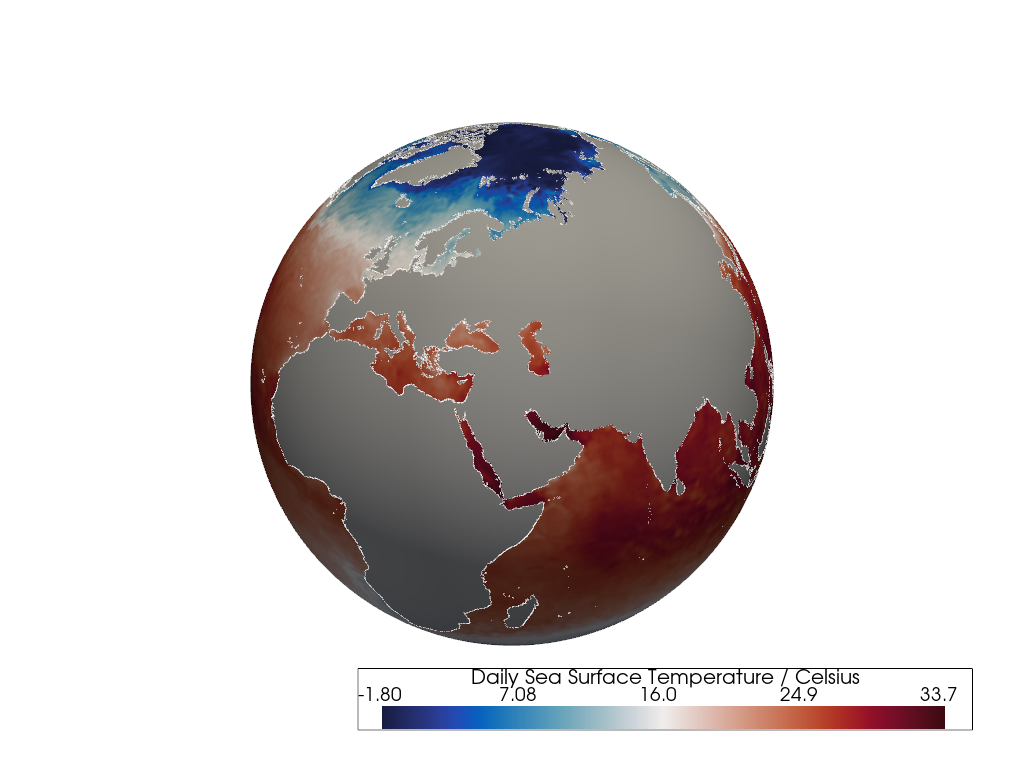
この例では,1次元のXおよびY**直線**座標を持つ2Dデータ配列を,海岸線付きの3Dの四角形 セル の メッシュ としてレンダリングします.
データソースは NOAA/NCEI Optimum Interpolation SST (OISST) Advanced Very High Resolution Radiometer (AVHRR) の 直線格子 で,1,036,800 個の四角形セルと 1,038,961 個の 点 を含んでいます.
メッシュは from_1d() メソッドを使用して,1次元の地理的経度と緯度の座標の境界から作成されます.各XおよびY座標には,四角形セルを記述する2つの座標境界があります.
メッシュセル上の2Dの*海面温度*データ配列は,知覚的に均一 な cmocean balance 発散カラーマップを使用してレンダリングされ,10m Natural Earth coastlines とともに表示されます.陸地セルはマスクされています.
import geovista as gv
from geovista.pantry.data import oisst_avhrr_sst

# Load sample data.
sample = oisst_avhrr_sst()

# Create the mesh from the sample data.
mesh = gv.Transform.from_1d(
    sample.lons,
    sample.lats,
    data=sample.data
)

# Plot the mesh with coastlines.
p = gv.GeoPlotter()
sargs = {"title": f"{sample.name} / {sample.units}"}
p.add_mesh(
    mesh,
    cmap="balance",
    scalar_bar_args=sargs
)
p.add_coastlines(color="white")
p.camera.zoom(1.2)
p.show()
NEMO ORCA2#
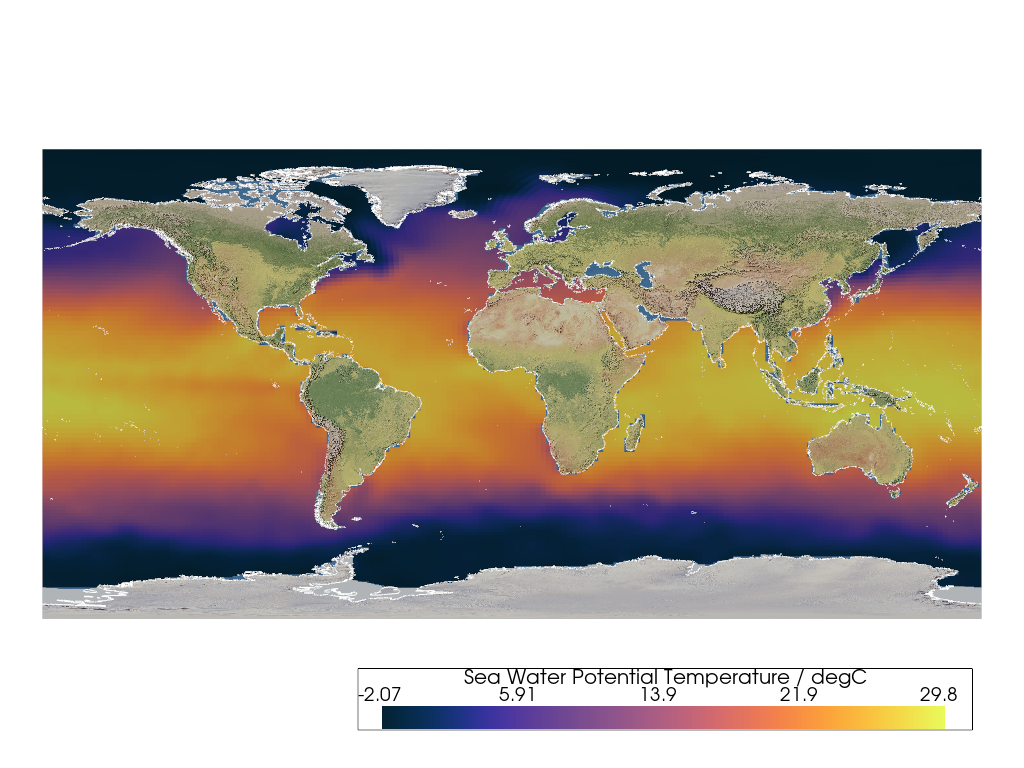
この例では,2DのXおよびY**曲線**座標を持つ2Dデータ配列を,3Dの四角形 セル の メッシュ としてレンダリングします.マスクされたデータを持つセルを削除するために しきい値 が適用されます.海岸線と ベースレイヤー も追加された後,結果は Plate Carrée 投影で平坦な2Dサーフェスに変換されます.
データソースは Nucleus for European Modelling of the Ocean (NEMO) ORCA2 全球海洋三極 曲線格子 で,26,640 個の四角形セルと 106,560 個の 点 を含んでいます.
グリッドは曲線格子であるため,from_2d() メソッドを使用して,2次元の地理的経度と緯度の座標の境界から作成されます.各XおよびY座標には,四角形セルを記述する4つの座標境界があります.
ORCA2は海洋モデルであるため,threshold を使用して 10,209 個の nan 陸地マスク セルを削除し,1:50m Natural Earth I ラスターで テクスチャマップ されたベースレイヤーを下に配置します.
知覚的に均一 な cmocean thermal カラーマップを使用して,グリッドセル上の*海水ポテンシャル温度*データをレンダリングし,10m Natural Earth coastlines で補完します.
最後に,cartopy CRS を使用して,シーン内の アクター を Equidistant Cylindrical (Plate Carrée) 正角円筒投影に変換します.
注釈
geovista では**円筒**投影と**擬似円筒**投影の基本的なサポートが利用可能です.geovista が成熟するにつれて,この機能を強化し,**方位**投影や**円錐**投影などの他の投影クラスで補完することを目指します.
import cartopy.crs as ccrs

import geovista as gv
from geovista.pantry.data import nemo_orca2

# Load sample data.
sample = nemo_orca2()

# Create the mesh from the sample data.
mesh = gv.Transform.from_2d(
    sample.lons,
    sample.lats,
    data=sample.data
)

# Remove cells from the mesh with NaN values.
mesh = mesh.threshold()

# Plot the mesh on a Plate Carrée projection using a cartopy CRS.
p = gv.GeoPlotter(crs=ccrs.PlateCarree())
sargs = {"title": f"{sample.name} / {sample.units}"}
p.add_mesh(
    mesh,
    cmap="thermal",
    scalar_bar_args=sargs
)
p.add_base_layer(texture=gv.natural_earth_1())
p.add_coastlines(color="white")
p.view_xy()
p.camera.zoom(1.4)
p.show()
WAVEWATCH III#
geovista は,さまざまな非構造地球科学モデルデータから メッシュ サーフェスを簡単に構築するための豊富なサポートを提供します.
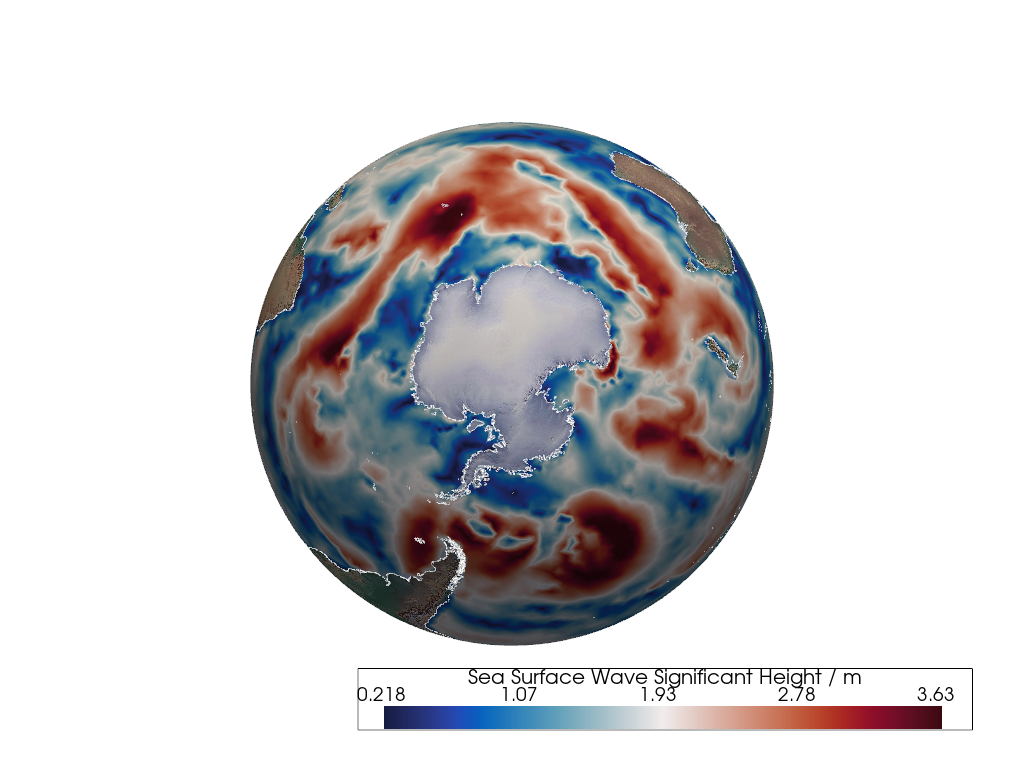
これを示すために,from_unstructured() メソッドを使用して,1次元のXおよびY**非構造**座標と2D 接続性 から WAVEWATCH III (WW3) 非構造三角形メッシュを作成します.
(30559, 3) の形状を持つ sample.connectivity は,16,160 個の1次元の地理的経度と緯度の点をインデックスして,30,559 個の三角形 セル を含むメッシュを作成するために使用されます.
1次元の*海面波有意波高*データ配列はメッシュ ノード 上に配置され,メッシュセル全体に補間された後,知覚的に均一 な cmocean balance 発散カラーマップでレンダリングされます.
WAVEWATCH IIIには陸地ベースのセルが含まれていないため,1:50m Natural Earth Cross-Blended Hypsometric Tints の テクスチャマップ された ベースレイヤー は,メッシュを threshold することなく下に表示されます.
最後に,10m Natural Earth coastlines でレンダリングを装飾します.
import geovista as gv
from geovista.pantry.data import ww3_global_tri

# Load the sample data.
sample = ww3_global_tri()

# Create the mesh from the sample data.
mesh = gv.Transform.from_unstructured(
    sample.lons,
    sample.lats,
    connectivity=sample.connectivity,
    data=sample.data,
)

# Plot the mesh.
p = gv.GeoPlotter()
sargs = {"title": f"{sample.name} / {sample.units}"}
p.add_mesh(
    mesh,
    cmap="balance",
    scalar_bar_args=sargs
)
p.add_coastlines(color="white")
p.add_base_layer(texture=gv.natural_earth_hypsometric())
p.view_xy(negative=True)
p.camera.zoom(1.2)
p.show()
Finite Volume Community Ocean Model#
この最後の例は,PyVista が地球科学データの可視化を文字通り次の次元に引き上げる方法を示しています.
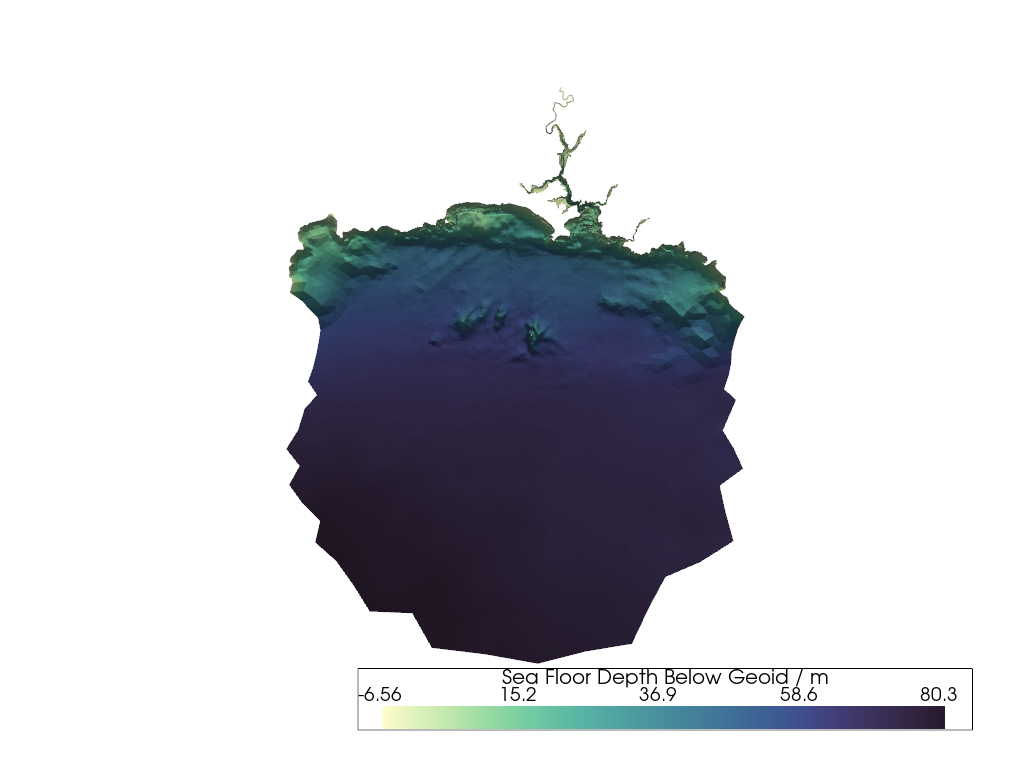
Finite Volume Community Ocean Model (FVCOM) データを使用して,イングランドコーンウォールの Plymouth Sound and Tamar River 水深の押し出し メッシュ を作成します.
まず,from_unstructured() メソッドを使用して,1次元のXおよびY**非構造**座標と2D 接続性 から三角形メッシュを作成します.
1次元の*ジオイド下海底深度*データ配列がメッシュ セル に追加されるだけでなく,メッシュ 点 にも追加され,メッシュサーフェス法線方向に比例的にスケーリングされた量だけメッシュ点を変位させるために使用されます.
このメッシュの変位または ワーピング は,川と海底の水深の起伏を明らかにし,インタラクティブに探索することができます.
import geovista as gv
from geovista.pantry.data import fvcom_tamar

# Load the sample data.
sample = fvcom_tamar()

# Create the mesh from the sample data.
mesh = gv.Transform.from_unstructured(
    sample.lons,
    sample.lats,
    connectivity=sample.connectivity,
    data=sample.face,
    name="face",
)

# Warp the mesh nodes by the bathymetry.
mesh.point_data["node"] = sample.node
mesh.compute_normals(cell_normals=False, point_normals=True, inplace=True)
mesh.warp_by_scalar(scalars="node", inplace=True, factor=2e-5)

# Plot the mesh.
p = gv.GeoPlotter()
sargs = {"title": f"{sample.name} / {sample.units}"}
p.add_mesh(
    mesh,
    cmap="deep",
    scalar_bar_args=sargs
)
p.view_poi()
p.show()
そして最後に ...#
この geovista 旋風ツアーが、あなたの食欲を刺激してくれることを願っています!
それでは,geovista の旅の 次のステップ を探索しましょう.