
-0.6.0.dev1062-gold?style=flat)
geovista.geodesic#
Provide geodesic operators for geolocated meshes.
ノート#
Added in version 0.1.0.
属性#
The bounding-box face geometry will contain |
|
Preference for selecting sample points outside/inside bounding-box. |
|
Ratio the bounding-box inner and outer faces are offset from the surface mesh. |
|
The bounding-box tolerance on intersection. |
|
Type alias for the corners of a bounding-box. |
|
Default geodesic ellipse. See |
|
Number of equally spaced geodesic points between/including end-point/s. |
|
The number of cubed-sphere panels. |
|
Cubed-sphere panel bounding-box longitudes and latitudes. |
|
Lookup table for cubed-sphere panel index by panel name. |
|
Cubed-sphere panel names. |
|
Lookup table for cubed-sphere panel name by panel index. |
|
The default bounding-box preference. |
Classes#
A 3D bounding-box constructed from geodesic lines or great circles. |
|
Enumeration of mesh geometry enclosed preferences. |
Functions#
|
Geodesic line consisting of one or more connected geodesic line segments. |
|
Calculate geodesic mid-points between provided start and end points. |
|
Calculate geodesic mid-points between provided start and end indices. |
|
Create boundary-box for specific cubed-sphere panel. |
|
Create geodesic bounding-box manifold wedge from the north to the south pole. |
モジュール内容#
- class geovista.geodesic.BBox(xs, ys, *, crs=WGS84, ellps=ELLIPSE, c=BBOX_C, triangulate=False)[ソース]#
A 3D bounding-box constructed from geodesic lines or great circles.
Create 3D geodesic bounding-box to extract enclosed mesh, lines or point.
The bounding-box region is specified in terms of its four corners using coordinates defined by the projection crs (defaults to
geovista.crs.WGS84). As the bounding-box is a geodesic composed of great-circle lines, it can only ever at most enclose half of an ellipsoid.The geometry of the bounding-box may be specified as either an open or closed point geometry i.e., 4 or 5 corner values.
- Parameters:
- xs
ArrayLike The x-coordinates of the bounding-box in canonical crs units. Note that longitudes will be wrapped to the half-closed interval
[-180, 180).- ys
ArrayLike The y-coordinates of the bounding-box in canonical crs units. Note that latitudes are in the closed interval
[-90, 90].- crs
str, optional The Coordinate Reference System of the provided xs and ys. Defaults to
geovista.crs.WGS84.- ellps
str, optional The ellipsoid for geodesic calculations. See
pyproj.list.get_ellps_map(). Defaults toELLIPSE.- c
float, optional The bounding-box face geometry will contain
c**2cells. Defaults toBBOX_C.- triangulate
bool, optional Specify whether the bounding-box faces are triangulated. Defaults to
False.
- xs
ノート
Added in version 0.1.0.
- __call__(surface)[ソース]#
Extract region of the surface contained within the bounding-box.
- Parameters:
- Returns:
参考
enclosedEquivalent method.
outsideProperty that selects points inside/outside manifold.
preferenceProperty that specifies criterion for surface cell inclusion.
toleranceProperty that controls manifold intersection tolerance.
ノート
Added in version 0.6.0.
- __eq__(other)[ソース]#
Perform an equality comparison with the other operand.
- Parameters:
- other
object Equality comparison performed with this operand.
- other
- Returns:
boolEquality comparison result.
ノート
Added in version 0.1.0.
- __ne__(other)[ソース]#
Perform an inequality comparison with the other operand.
- Parameters:
- other
object Inequality comparison performed with this operand.
- other
- Returns:
boolInequality comparison result.
ノート
Added in version 0.1.0.
- __repr__()[ソース]#
Serialize
BBoxrepresentation.- Returns:
strString representation of the instance.
ノート
Added in version 0.1.0.
- boundary(surface=None, *, radius=None)[ソース]#
Footprint of bounding-box intersecting on the provided mesh surface.
The region of the bounding-box that intersects on the surface of the mesh that will be enclosed.
- Parameters:
- surface
PolyData, optional The
PolyDatamesh that will be enclosed by the bounding-box boundary.- radius
float, optional The radius of the spherical mesh that will be enclosed by the bounding-box boundary. Note that the radius is only used when the surface is not provided. Defaults to
geovista.common.RADIUS.
- surface
- Returns:
PolyDataThe boundary of the bounding-box.
ノート
Added in version 0.1.0.
Examples
Add the boundary of a
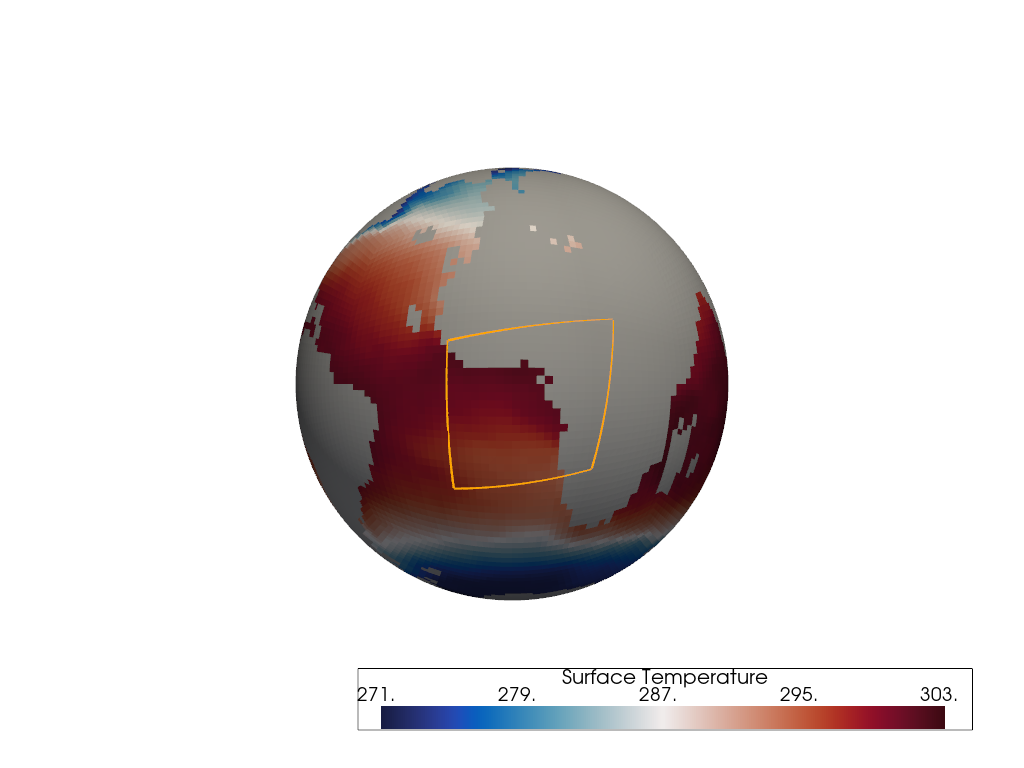
C32bounding-box to the plotter for a region around the Gulf of Guinea. The geodesic bounding-box is generated by defining 4 longitude-latitude corners.The boundary is generated from where the bounding-box intersects with the surface of the C48 Sea Surface Temperature (SST) cubed-sphere mesh.
>>> import geovista
>>> from geovista.geodesic import BBox
>>> from geovista.pantry.meshes import lfric_sst
>>> p = geovista.GeoPlotter()
>>> mesh = lfric_sst()
>>> _ = p.add_mesh(mesh, cmap="balance")
>>> bbox = BBox(xs=[-15, 20, 25, -15], ys=[-25, -20, 15, 10], c=32)
>>> _ = p.add_mesh(bbox.boundary(mesh), color="orange", line_width=3)
>>> p.view_yz()
>>> p.show()
- enclosed(surface, /, *, tolerance=None, outside=None, preference=None)[ソース]#
Extract region of the surface contained within the bounding-box.
Note that points that are on the surface of the bounding-box manifold are not considered within the bounding-box. See the preference and tolerance options.
- Parameters:
- surface
PolyData The
PolyDatamesh to be checked for containment.- tolerance
float, optional The tolerance on the intersection operation with the surface, expressed as a fraction of the diagonal of the bounding-box. See
select_interior_points()for further details. Defaults toBBOX_TOLERANCE.- outside
bool, optional By default, select those points of the surface that are inside the bounding-box. Otherwise, select those points that are outside the bounding-box. Defaults to
BBOX_OUTSIDE.- preference
strorEnclosedPreference, optional Criteria for defining whether a face of a surface mesh is deemed to be enclosed by the bounding-box. A preference of
cellrequires all points defining the face to be within the bounding-box. A preference ofcenterrequires that only the face cell center is within the bounding-box. A preference ofpointrequires at least one point that defines the face to be within the bounding-box. Defaults toPREFERENCE.
- surface
- Returns:
ノート
Added in version 0.1.0.
Examples
Add the boundary of a
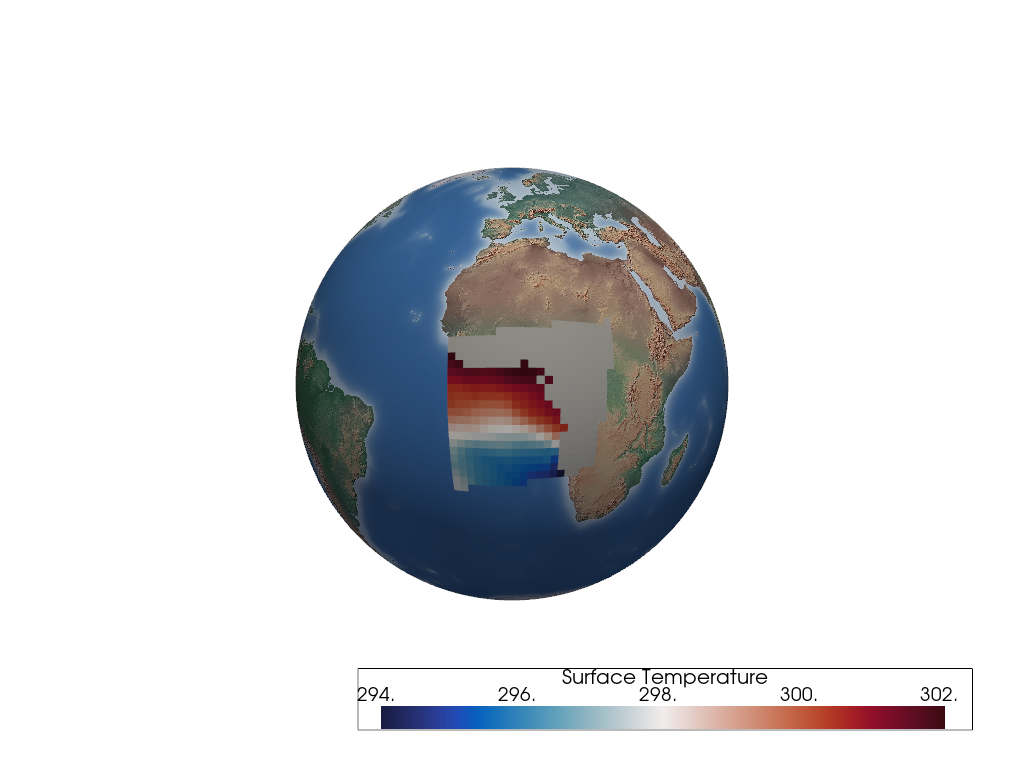
C32bounding-box to the plotter for a region around the Gulf of Guinea. The geodesic bounding-box is generated by defining 4 longitude-latitude corners.Add the region enclosed by a
C32bounding-box manifold to the plotter for a region around the0meridian. The geodesic bounding-box is generated by defining 4 longitude-latitude corners.The region is generated from all cells of the C48 Sea Surface Temperature (SST) cubed-sphere mesh that have their cell
centerenclosed by the bounding-box manifold.>>> import geovista >>> from geovista.geodesic import BBox >>> from geovista.pantry.meshes import lfric_sst >>> p = geovista.GeoPlotter() >>> _ = p.add_base_layer(texture=geovista.natural_earth_hypsometric()) >>> mesh = lfric_sst() >>> bbox = BBox(xs=[-15, 20, 25, -15], ys=[-25, -20, 15, 10], c=32) >>> region = bbox.enclosed(mesh) >>> _ = p.add_mesh(region, cmap="balance") >>> p.view_yz() >>> p.show()
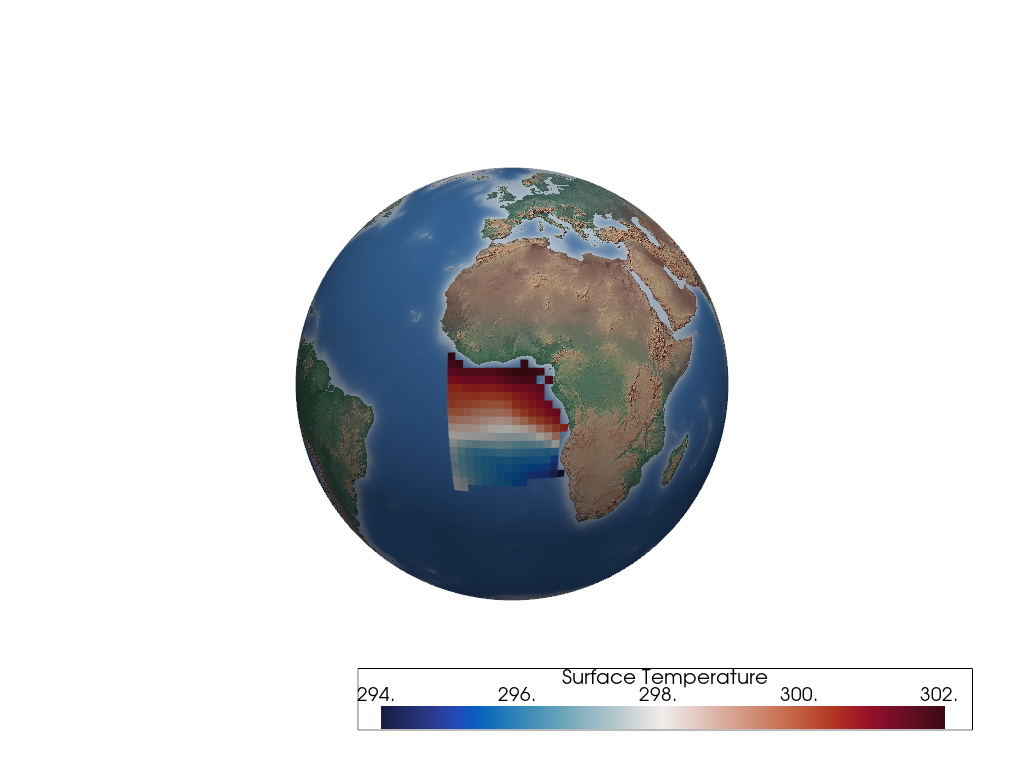
The same
regionis rendered again, but with the land mask cells removed using thepyvista.DataSetFilters.threshold()filter.>>> p = geovista.GeoPlotter() >>> _ = p.add_base_layer(texture=geovista.natural_earth_hypsometric()) >>> _ = p.add_mesh(region.threshold(), cmap="balance") >>> p.view_yz() >>> p.show()
- c = 256#
The number of cells that define the bounding-box face geometry i.e., c^2.
- crs#
The coordinate reference system of the bounding-box points.
- ellps = 'WGS84'#
The ellipsoid defining the geodesic surface.
- property mesh: pyvista.PolyData#
The manifold bounding-box mesh.
- Returns:
PolyDataThe bounding-box mesh.
ノート
Added in version 0.1.0.
Examples
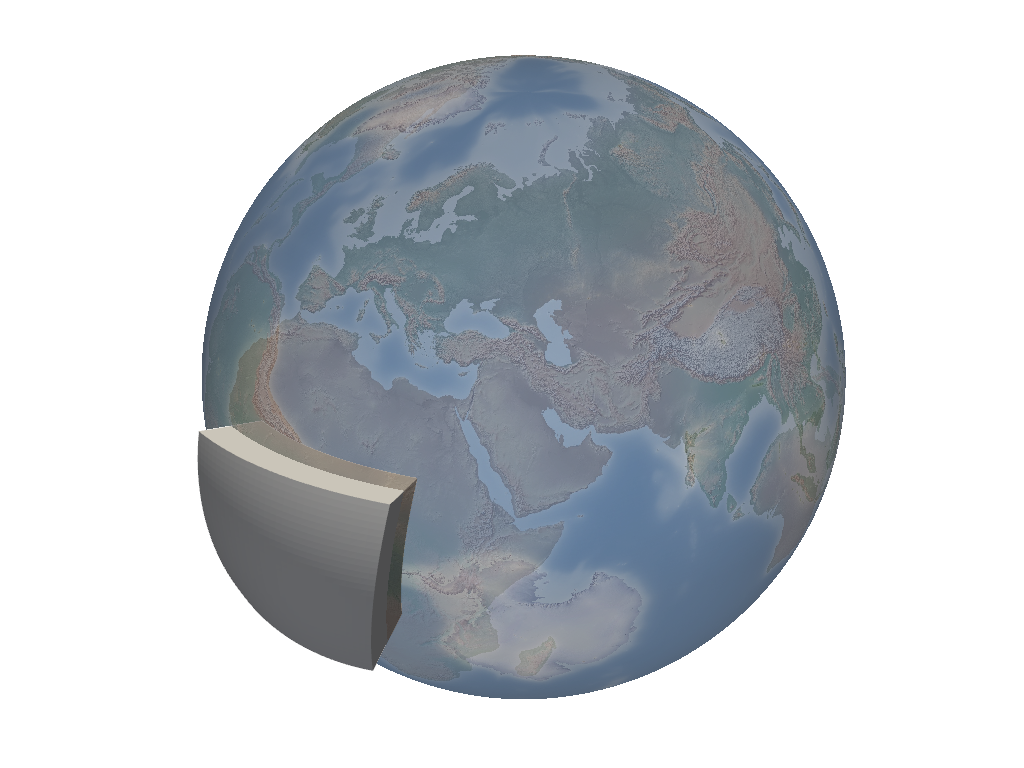
Add a
C32bounding-box around the Gulf of Guinea. The geodesic bounding-box is generated by defining 4 longitude-latitude corners. Natural Earth coastlines are also rendered along with a texture mapped Natural Earth base layer.>>> import geovista >>> from geovista.geodesic import BBox >>> p = geovista.GeoPlotter() >>> _ = p.add_base_layer( ... texture=geovista.natural_earth_hypsometric(), opacity=0.5 ... ) >>> bbox = BBox(xs=[-15, 20, 25, -15], ys=[-25, -20, 15, 10], c=32) >>> _ = p.add_mesh(bbox.mesh, color="white") >>> p.camera.zoom(1.5) >>> p.show()
- property outline: pyvista.PolyData#
The manifold bounding-box mesh edges.
- Returns:
PolyDataThe bounding-box mesh edges.
ノート
Added in version 0.6.0.
Examples
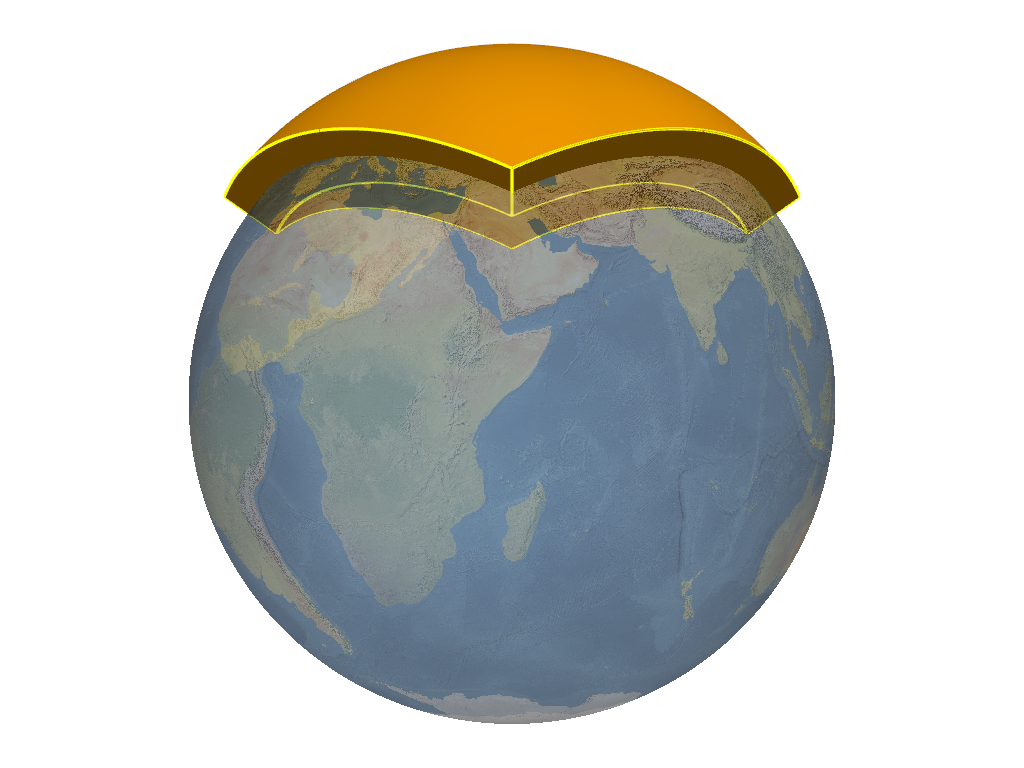
Add the geodesic bounding-box manifold for the Arctic cubed-sphere panel along with its edges. A texture mapped Natural Earth base layer is also rendered.
>>> import geovista
>>> from geovista.geodesic import panel
>>> p = geovista.GeoPlotter()
>>> _ = p.add_base_layer(texture=geovista.natural_earth_1(), opacity=0.5)
>>> bbox = panel("arctic")
>>> _ = p.add_mesh(bbox.mesh, color="orange")
>>> _ = p.add_mesh(bbox.outline, color="yellow", line_width=3)
>>> p.view_vector(vector=(1, 1, 0))
>>> p.camera.zoom(1.5)
>>> p.show()
- property outside: bool#
The preference to select points outside/inside the bounding-box.
- Returns:
boolManifold bounding-box selection preference.
ノート
Added in version 0.6.0.
- property preference: EnclosedPreference#
The criterion for cell containment within the bounding-box.
- Returns:
EnclosedPreferenceThe bounding-box enclosed preference.
ノート
Added in version 0.6.0.
- property tolerance: float#
The tolerance of the bounding-box manifold intersection.
See
select_interior_points()for further details.- Returns:
floatThe bounding-box manifold intersection tolerance.
ノート
Added in version 0.6.0.
- triangulate = False#
Whether the bounding-box faces are triangulated.
- xs#
The x points of the bounding-box in canonical CRS units.
- ys#
The y points of the bounding-box in canonical CRS units.
- class geovista.geodesic.EnclosedPreference[ソース]#
Bases:
geovista.common.StrEnumPlusEnumeration of mesh geometry enclosed preferences.
ノート#
Added in version 0.3.0.
Initialize self. See help(type(self)) for accurate signature.
- CELL = 'cell'#
Enclosed if all cell vertices within bounding-box manifold.
- CENTER = 'center'#
Enclosed if cell center within bounding-box manifold.
- POINT = 'point'#
Enclosed if at least one cell vertex within bounding-box manifold.
- geovista.geodesic.line(lons, lats, *, surface=None, radius=None, npts=None, ellps=None, close=False, zlevel=None, zscale=None)[ソース]#
Geodesic line consisting of one or more connected geodesic line segments.
Note that as a convenience, if a single value is provided for lons and
Nvalues are provided for lats, then the longitude value will be automatically repeatedNtimes, and vice versa, providingN >= 2.- Parameters:
- lons
ArrayLike The longitudes (degrees) of the geodesic line segments, in the half-closed interval
[-180, 180). Note that longitudes will be wrapped to this interval.- lats
ArrayLike The latitudes (degrees) of the geodesic line segments, in the closed interval
[-90, 90].- surface
PolyData, optional The surface that the geodesic line will be rendered over.
- radius
float, optional The radius of the spherical surface that the geodesic line will be rendered over. Note that the radius is only used when the surface is not provided. Defaults to
geovista.common.RADIUS.- npts
float, optional The number of equally spaced geodesic points in a line segment, excluding the segment end-point, but including the segment start-point i.e., npts must be at least 2. Defaults to
GEODESIC_NPTS.- ellps
str, optional The ellipsoid for geodesic calculations. See
pyproj.list.get_ellps_map(). Defaults toELLIPSE.- close
bool, optional Whether to close the geodesic line segments into a loop i.e., the last point is connected to the first point. Defaults to
False.- zlevel
int, optional The z-axis level. Used in combination with the zscale to offset the radius by a proportional amount i.e.,
radius * zlevel * zscale. Defaults to1.- zscale
float, optional The proportional multiplier for z-axis zlevel. Defaults to
geovista.common.ZLEVEL_SCALE.
- lons
- Returns:
PolyDataThe geodesic line.
ノート
Added in version 0.1.0.
Examples
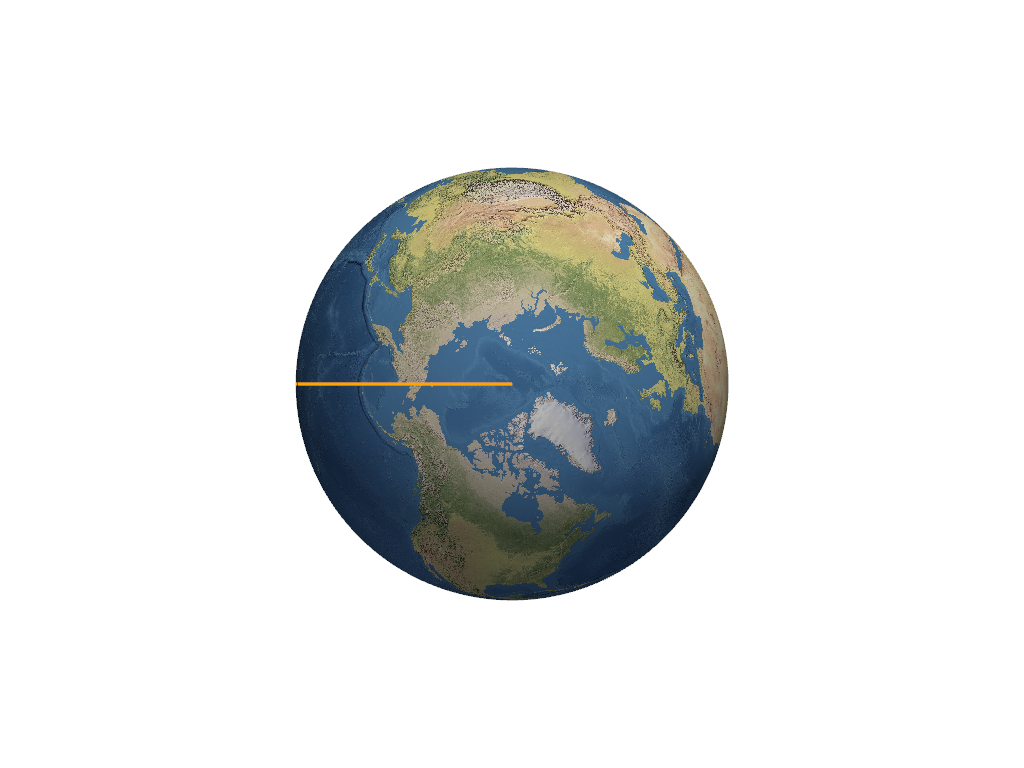
Add the anti-meridian great circle to the plotter. A texture mapped Natural Earth base layer is also rendered.
>>> import geovista
>>> from geovista.geodesic import line
>>> p = geovista.GeoPlotter()
>>> _ = p.add_base_layer(texture=geovista.natural_earth_1())
>>> meridian = line(lons=-180, lats=[90, 0, -90])
>>> _ = p.add_mesh(meridian, color="orange", line_width=3)
>>> p.view_xy()
>>> p.show()
- geovista.geodesic.npoints(start_lon, start_lat, end_lon, end_lat, *, npts=GEODESIC_NPTS, radians=False, include_start=False, include_end=False, geod=None)[ソース]#
Calculate geodesic mid-points between provided start and end points.
Given a single start-point and end-point, calculate the equally spaced intermediate longitude and latitude npts points along the geodesic line that spans between the start and end points.
Note that longitudes (degrees) will be wrapped to the half-closed interval
[-180, 180).- Parameters:
- start_lon
float The longitude of the start-point for the geodesic line.
- start_lat
float The latitude of the start-point for the geodesic line.
- end_lon
float The longitude of the end-point for the geodesic line.
- end_lat
float The latitude of the end-point for the geodesic line.
- npts
int, optional The number of points to be returned, which may include the start-point and/or the end-point, if required. Defaults to
GEODESIC_NPTS.- radians
bool, optional If
True, the start and end points are assumed to be in radians, otherwise degrees. Defaults toFalse.- include_start
bool, optional Whether to include the start-point in the geodesic points returned. Defaults to
False.- include_end
bool, optional Whether to include the end-point in the geodesic points returned. Defaults to
False.- geod
Geod, optional Definition of the ellipsoid for geodesic calculations. Defaults to
ELLIPSE.
- start_lon
- Returns:
tupleTuple of longitude points and latitude points along the geodesic line between the start-point and the end-point.
ノート
Added in version 0.1.0.
Examples
>>> from geovista.geodesic import npoints
>>> import numpy as np
>>> points = npoints(start_lon=-10, start_lat=20, end_lon=10, end_lat=30, npts=5)
>>> np.array(points, dtype=np.float16)
array([[-6.887, -3.69 , -0.41 ,  2.963,  6.43 ],
       [21.84 , 23.62 , 25.34 , 26.98 , 28.53 ]], dtype=float16)
- geovista.geodesic.npoints_by_idx(lons, lats, start_idx, end_idx, *, npts=GEODESIC_NPTS, radians=False, include_start=False, include_end=False, geod=None)[ソース]#
Calculate geodesic mid-points between provided start and end indices.
Given a single start-point index and end-point index, calculate the equally spaced intermediate longitude and latitude npts points along the geodesic line that spans between the start and end points.
Note that longitudes (degrees) will be wrapped to the half-closed interval
[-180, 180).- Parameters:
- lons
ArrayLike The longitudes to be sampled by the provided indices.
- lats
ArrayLike The latitudes to be sampled by the provided indices.
- start_idx
int The index of the start-point.
- end_idx
int The index of the end-point.
- npts
int, optional The number of points to be returned, which may include the start-point and/or the end-point, if required. Defaults to
GEODESIC_NPTS.- radians
bool, optional If
True, the lons and lats are assumed to be in radians, otherwise degrees. Defaults toFalse.- include_start
bool, optional Whether to include the start-point in the geodesic points returned. Defaults to
False.- include_end
bool, optional Whether to include the end-point in the geodesic points returned. Defaults to
False.- geod
Geod, optional Definition of the ellipsoid for geodesic calculations. Defaults to
ELLIPSE.
- lons
- Returns:
tupleTuple of longitude points and latitude points along the geodesic line between the start-point and the end-point.
ノート
Added in version 0.1.0.
Examples
>>> from geovista.geodesic import npoints_by_idx
>>> import numpy as np
>>> points = npoints_by_idx(
...     lons=[-10, 0, 10], lats=[20, 25, 30], start_idx=0, end_idx=1, npts=5
... )
>>> np.array(points, dtype=np.float16)
array([[-8.38 , -6.746, -5.09 , -3.414, -1.718],
       [20.88 , 21.73 , 22.58 , 23.4  , 24.22 ]], dtype=float16)
- geovista.geodesic.panel(name, /, *, ellps=ELLIPSE, c=BBOX_C, triangulate=False)[ソース]#
Create boundary-box for specific cubed-sphere panel.
- Parameters:
- name
intorstr The cubed-sphere index, see
PANEL_NAME_BY_IDX, or name, seePANEL_IDX_BY_NAME, which specifies the panel bounding-box, seePANEL_BBOX_BY_IDX.- ellps
str, optional The ellipsoid for geodesic calculations. See
pyproj.list.get_ellps_map(). Defaults toELLIPSE.- c
float, optional The bounding-box face geometry will contain
c**2cells. Defaults toBBOX_C.- triangulate
bool, optional Specify whether the panel bounding-box faces are triangulated. Defaults to
False.
- name
- Returns:
BBoxThe bounding-box that encloses the required cubed-sphere panel.
ノート
Added in version 0.1.0.
Examples
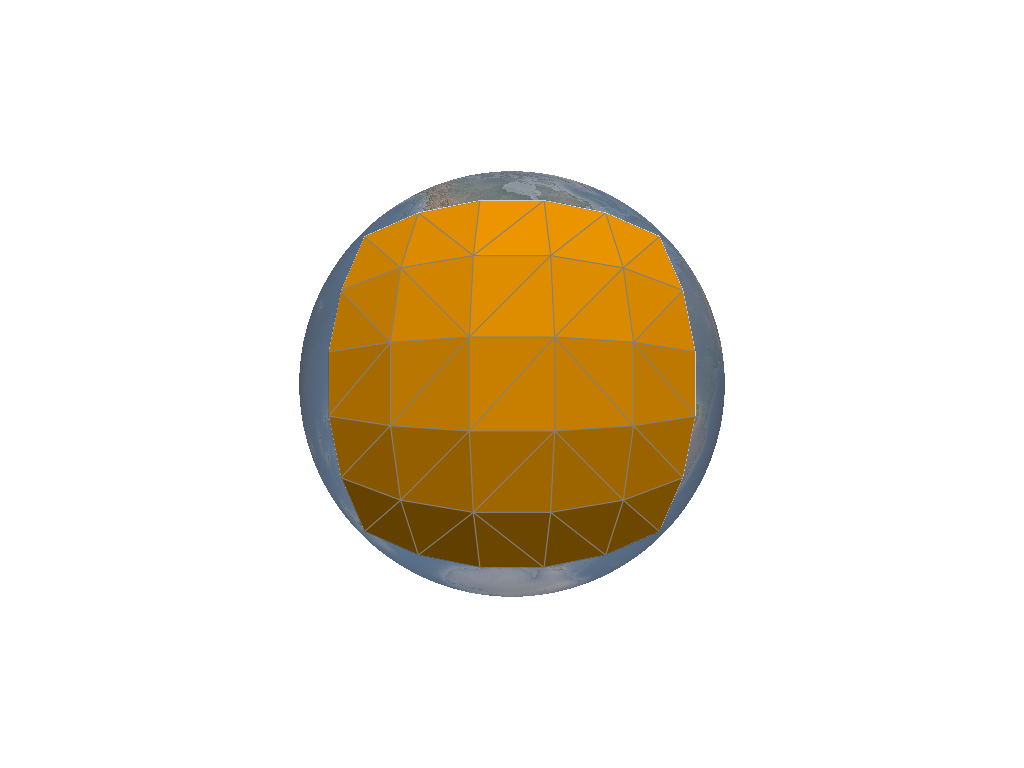
Add a
wireframebounding-box to the plotter for theamericaspanel of a cubed-sphere. The geodesic bounding-box is generated from the 4 corners of the cubed-sphere panel located over Americas. A texture mapped Natural Earth base layer is also rendered.>>> import geovista >>> from geovista.geodesic import panel >>> p = geovista.GeoPlotter() >>> _ = p.add_base_layer(texture=geovista.natural_earth_hypsometric(), opacity=0.5) >>> bbox = panel("americas", c=5, triangulate=True) >>> _ = p.add_mesh(bbox.mesh, color="orange", show_edges=True) >>> p.view_xz() >>> p.show()
- geovista.geodesic.wedge(lon1, lon2, *, ellps=ELLIPSE, c=BBOX_C, triangulate=False)[ソース]#
Create geodesic bounding-box manifold wedge from the north to the south pole.
- Parameters:
- lon1
float The first longitude (degrees) defining the geodesic wedge region.
- lon2
float The second longitude (degrees) defining the geodesic wedge region.
- ellps
str, optional The ellipsoid for geodesic calculations. See
pyproj.list.get_ellps_map(). Defaults toELLIPSE.- c
float, optional The bounding-box face geometry will contain
c**2cells. Defaults toBBOX_C.- triangulate
bool, optional Specify whether the wedge bounding-box faces are triangulated. Defaults to
False.
- lon1
- Returns:
BBoxThe bounding-box that encloses the required geodesic wedge.
ノート
Added in version 0.1.0.
Examples
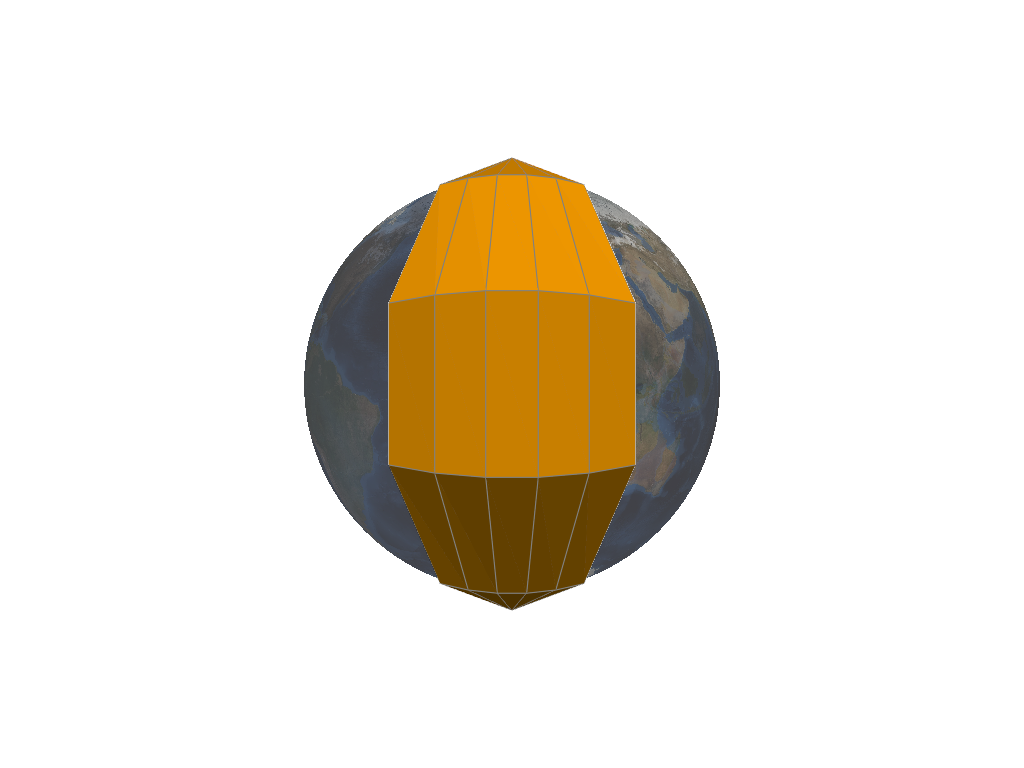
Add a
C8sixty-degree widewireframebounding-box wedge to the plotter. A texture mapped NASA Blue Marble base layer is also rendered.>>> import geovista >>> from geovista.geodesic import wedge >>> p = geovista.GeoPlotter() >>> _ = p.add_base_layer(texture=geovista.blue_marble(), opacity=0.5) >>> bbox = wedge(-30, 30, c=5) >>> _ = p.add_mesh(bbox.mesh, color="orange", show_edges=True) >>> p.view_yz() >>> p.show()
- geovista.geodesic.BBOX_OUTSIDE: bool = False#
Preference for selecting sample points outside/inside bounding-box.
- geovista.geodesic.BBOX_RADIUS_RATIO: float = 0.1#
Ratio the bounding-box inner and outer faces are offset from the surface mesh.
- type geovista.geodesic.Corners = tuple[float, float, float, float]#
Type alias for the corners of a bounding-box.
- geovista.geodesic.ELLIPSE: str = 'WGS84'#
Default geodesic ellipse. See
pyproj.list.get_ellps_map().
- geovista.geodesic.GEODESIC_NPTS: int = 64#
Number of equally spaced geodesic points between/including end-point/s.
- geovista.geodesic.PANEL_BBOX_BY_IDX: dict[int, tuple[Corners, Corners]]#
Cubed-sphere panel bounding-box longitudes and latitudes.
- geovista.geodesic.PANEL_IDX_BY_NAME: dict[str, int]#
Lookup table for cubed-sphere panel index by panel name.
- geovista.geodesic.PANEL_NAMES: list[str] = ['africa', 'asia', 'pacific', 'americas', 'arctic', 'antarctic']#
Cubed-sphere panel names.